Rocksmith 2014 on CachyOS/Arch Linux
Introduction
Yes! 2025 is the year of the Linux desktop! I’ve always liked Linux as a desktop OS, but one thing was lacking: gaming.
Lots of things happened in the gaming on Linux space. I’m not an expert, but I think the Steam Deck played a big role. SteamOS, the software that runs on the Steam Deck, is based on Arch Linux and KDE/Plasma. Many games are either compatible with Linux, or they make use of the Proton compatibility layer developed by Valve. Proton is what allows you to run Windows games on Linux - mostly.
Many games that are Windows only are perfectly supported on Linux through Proton. Latest in that list is probably Arc Raiders (go play that if you haven’t already). The main blocker for games to run on Linux often are DRM measure. Recent Battlefield games for instance are notorious for their use of (Windows) kernel level anti-cheat. Whatever your opinion is on that, those don’t port over to Linux. (I read they do port over, but that it’s a developer’s choice to enable this option or not).
Anyway, I play Rocksmith 2014 Remastered a lot. On Windows. Until today. Rocksmith is an older game that is not well supported on Linux or through Proton, mainly because it uses some wonky hardware integration with the Real Tone Cable, a USB analog-to-digital converter that plugs into your bass or guitar.
Below you find the settings I used and tinkering I did to play Rocksmith 2014 Remastered on my CachyOS Linux PC with fully working audio and video - just the way you like it - including CDLC!
Configuration & Tinkering
1. Install Steam, Rocksmith 2014 and other essentials.
If you haven’t already, install Steam and Rocksmith 2014 on your Linux box. Also install the gamemode package.
Install Steam (including other gaming related packages) and
gamemodefrom a terminal:sudo pacman -S cachyos-gaming-meta gamemodeStart and log in to Steam.
Install Rocksmith 2014 Remastered from your library.
2. Set Launch Options
Go to RS2014 -> Properties -> General and set Launch Options to PIPEWIRE_LATENCY=256/48000 gamemoderun %command%.
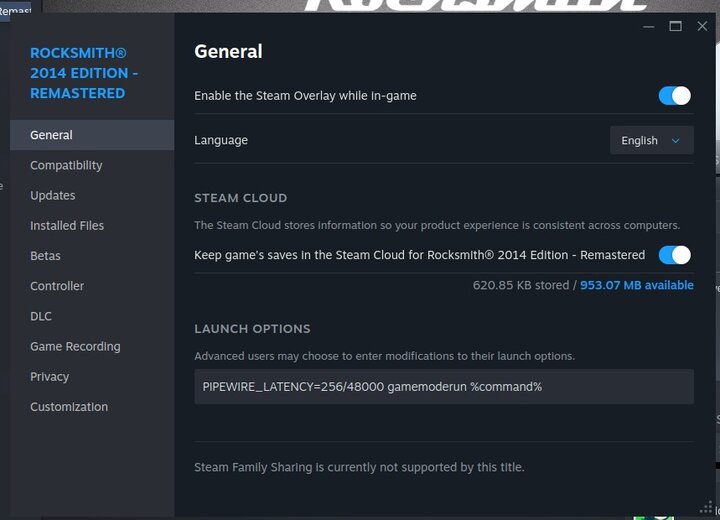
3. Real Tone Cable / Audio Configuration
Plug the RealTone Cable into your computer.
Make sure Rocksmith will use ALSA for audio:
protontricks 221680 sound=alsaRun
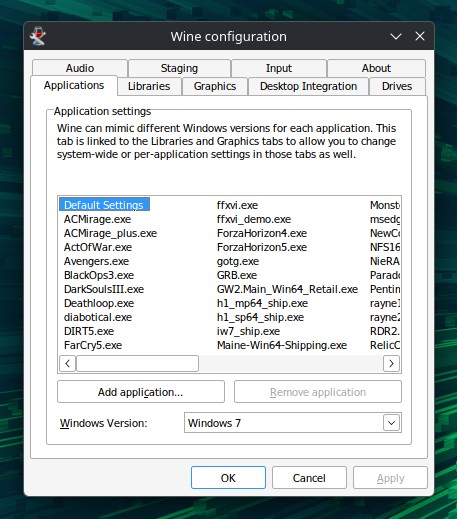
winecfgfor Rocksmith.protontricks 221680 winecfgUnder Applications, set the Windows version to Win7.
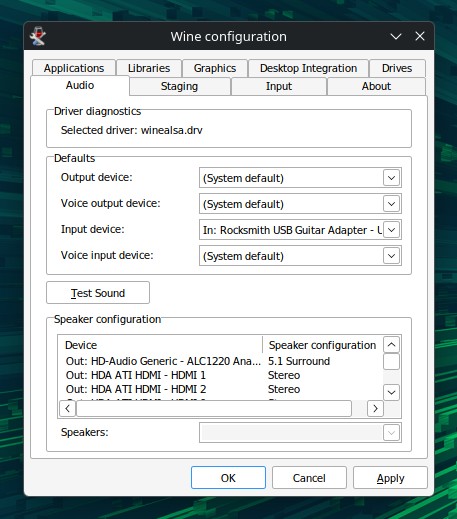
Under Audio, for Input Device, select your Real Tone Cable. The rest should be left at default.
4. Edit Rocksmith.ini
- Start Rocksmith once to generate the
Rocksmith.inifile in the game directory. Just start it and quit the game again directly. - From Steam, go to RS2014 -> Manage -> Browse local files.
- Edit your
Rocksmith.inifile and make the following two settings are present:ExclusiveMode=0Win32UltraLowLatencyMode=0
5. Set input volume (optional)
If you find your bass/guitar input to be very loud in RS2014, use alsamixer in a terminal. Hit F6 to select the Real Tone Cable and then F4 to see/adjust the capture volume.
6. Enabling CDLC (optional)
If you want to use Custom Downloadable Content (CDLC) in Rocksmith 2014, you need to install a custom D3DX9_42.dll in the game directory.
Normally, you can download a nice .exe from CustomsForge that will install the latest .dll to enable CDLC. There seems to be an issue with recent releases of the CDLC enabler on Linux. In my case it would crash the game on start-up.
I found an older D3DX9_42.dll. This one still relies on the Cherub Rock DLC to be installed, but at least is does not crash the game.
So, download this file above and put in the RS2014 game dir (next to Rocksmith.ini).
If you already used the latest installer from CustomsForge, no worries, just replace the installed version of D3DX9_42.dll with the one you can download here.
7. Start shreddin'
That’s all. You can now launch RS2014 from Steam and everything should work as expected.